

Lynsie M. Stout, CTC
Travel professionals are often asked to give public presentations to sell specific products or destinations. This white paper sets out to give helpful information on creating engaging PowerPoint presentations as well as offering tips on how to make presentations of this nature more effective. Giving a highly effective presentation is a skill, not a talent, which means that preparation and coaching can greatly impact the success of your delivery [1]. This is a heavily researched topic, and as such, this white paper serves as a summary of the most useful highlights rather than an extensive review, especially when considering the sheer number of destinations and products offered in the area of travel. For ease of use, this topic has been broken into four distinct sections: Planning the Presentation, Preparing the PowerPoint, Practicing, and Presenting.
Planning the Presentation
This section will be the most time-consuming step in any presentation. Making proper choices during the planning phase will make the creation of the PowerPoint easier, and it should assist with both the practicing and presenting phases as well. Most travel presentations work to either sell a specific product or teach about a specific location. In both cases, you are selling an experience to the audience. Therefore, you need to find how this place imparts its story [7] or how this way of travel enriches the overall trip. What makes it compelling? What differentiates it from the thousands of other options or places? Be purposeful about the information you choose to include so that you’re representing the experience in a way that’s authentic and intriguing [2].
As with all presentations, it should be structured to include an introduction, a body, and a conclusion [1]. Reflecting on the purpose and goal of your presentation is helpful when deciding how to frame your topic8. Good presentations need to tell a story [2], and they spend time highlighting the best parts of the destination or way of traveling. Tell the audience why you care about this location or way of traveling when introducing your topic, and explain to them why they should also be interested [1]. Use the introduction section to outline the upcoming information and set an agenda for how the presentation will progress [8].
In this section, you’ll also want to take time to think about how you’ll be introduced to the audience. Are you going to introduce yourself or will a coworker or community member handle that? In either case, give the audience your name, your job title. Should you choose to state your expertise in the area of your presentation8, don’t rattle off a resume of accolades. Since you’re giving the presentation, audiences will generally recognize that you’re an expert, so there’s no need to spend a portion of your limited time convincing them [1].
During your introduction, it can be a good idea to remind the audience that you simply cannot describe all that Ireland or Tokyo has to offer in one presentation. Instead, focus your limited time on key experiences or unexpected destination details and tell the story in a way that moves them and makes them want the experience for themselves [1]. Trying to cover too much will keep your audience from being engaged. They’ve come to learn from you, not to be read a long, overwhelming list of information that could otherwise be delivered in a simpler format such as an email [7].
Curate the body of the message to your specific audience8. There is no need to repeat things that they likely already know [10]. For example, a presentation given to first-time cruisers will certainly differ from one given to past Viking River Cruise guests. Take into account audience knowledge, and build from there9 to help keep your audience focused. People tend to be most interested in stories and ideas, so be sure to build your presentation in a way that highlights experiences and benefits over features [1].
The conclusion to the presentation should be a brief summary of your story and main points [8]. This part of the presentation allows you to raise additional questions or offer final pieces of advice. In most instances, the conclusion is followed by a period where the audience can ask questions or ask for clarification if needed2. While it’s possible to take questions as you move through the presentation, asking audience members to hold them until the end can help maintain the flow of the presentation [10]. This format also allows questions to feed off one another and conclude the presentation with audience interaction.
Once you’ve finished planning the presentation, take time to refine it. Have others edit your work, and review everything with a critical eye before moving on to preparing the PowerPoint.
Preparing the PowerPoint
Presentations combine the spoken words of the presenter with powerful visuals to reinforce the story that you’re trying to tell or the product you’re trying to sell8. PowerPoint is a useful way to present visual information—the program is fairly simple to use and is widely available [7]. That being said, the audience is here to learn, not to watch a fancy PowerPoint9. It’s critical that the message you’re sharing be enhanced by the PowerPoint [10], not overpowered by it [5]. Slide content and design matter [6], and it’s important that these aspects be engaging yet simple enough to support the message of the presentation [5]. There are a few tricks that will help PowerPoint achieve this balance.
First, take into account slide design [7]. Slide backgrounds should be either plain or a photo [4]. Keeping the background simple will make it easier for people to read words on the screen [9]. Reading white text on a black background is simpler than reading bright colors (like red) on a white background [5]. Limiting yourself to a single font choice will help with readability as well [9]. Text should be large and to the point. As a general rule, avoid clip art and word animations [4]; irrelevant visuals detract from the key point of the slide [5]. Fewer words on any given slide often make them easier to read [9]– remember, the slides are simply supposed to enhance what you’re saying, so use bulleted lists [4], bold graphs [5], or photos [7] rather than a paragraph.
Second, travel photos can really help tell the story, but be sure to label the location where the photo was taken [4]. There’s little sense in including a beautiful photo to elicit the “I have to go there!” response if you don’t label the destination. If possible, use personal travel photos and note them as such. This can help lend weight to your expertise. Short videos can be a great addition9 as long as they help tell the story and the audio can be clearly heard by everyone [6]. Musical choices authentic to the destination can be helpful when discussing travel as well, but team it up with photos as the visual can act as an aid for clarity. And importantly, don’t try to speak over it while presenting.
Third, because PowerPoint is such a visual tool, I’m including a few examples of slides that have been reworked to be clearer for the audience:
Example 1:
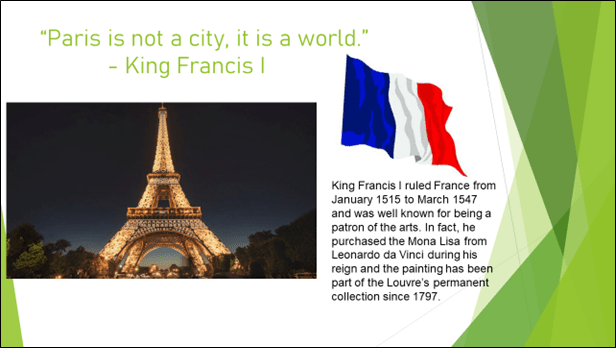
This slide is problematic because the background is busy and generic, there are too many words on a single slide, the clip art is distracting and unnecessary, and it is difficult to read. As it currently stands, it doesn’t help emphasize the grandeur of France and therefore doesn’t help tell the story.

This slide is easier to read, emphasizes a famous travel landmark, and reinforces the story that the presenter is telling. The additional information on King Francis I can be given by the presenter if necessary.
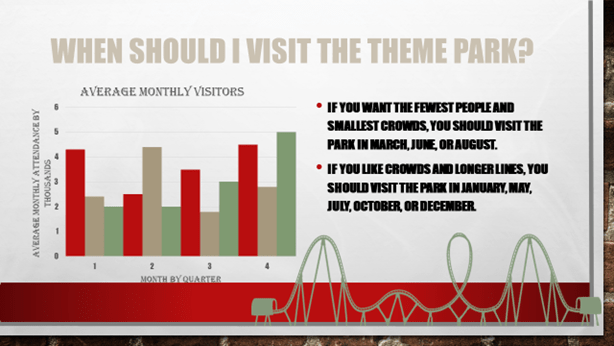
This slide is problematic because it has multiple font types, colors, and sizes. There are too many words and a large amount of information. Audience members are going to be distracted by trying to decipher this slide rather than focusing on the presenter.
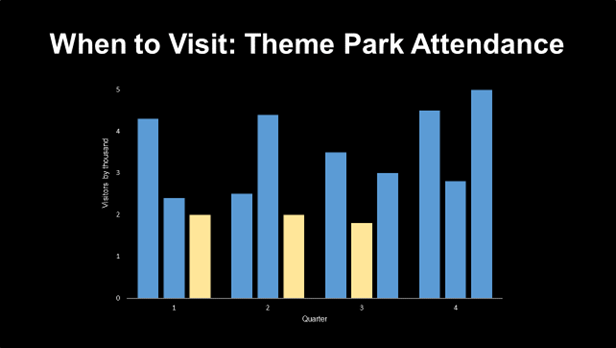
This slide is easier to read and is far less distracting. It emphasizes the information being given by the presenter verbally.
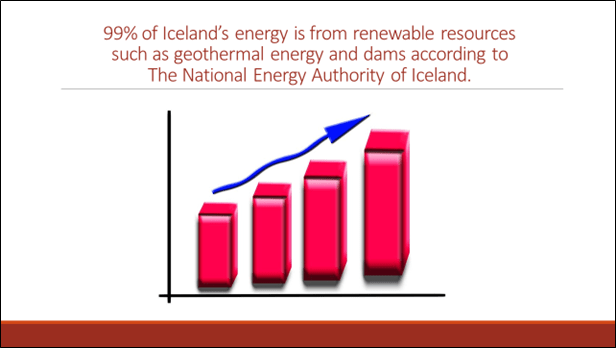
This slide is problematic because the majority of the slide is filled with irrelevant clip art, and the red-on-white text is difficult to read. It’s not very engaging.

This slide offers viewers a glimpse of the amazing scenery of Iceland while simplifying the message for the audience. It’s much more impactful than the previous slide.
Finally, once you’ve built your PowerPoint, it’s very important to edit it properly. Take time to double-check spelling and grammar, and ask a colleague to review it as well. To be sure that you’re making the proper choices for your presentation, take time to think of your audience’s experience. Is this slide easy to see, even from the back of the room? Does this specific slide aid or detract from your message? How does this slide assist in telling the story? Remove slides that are repetitive or don’t enhance your verbal presentation10 and correct any slides that are difficult to see or understand.
While the preceding tips are useful in constructing an effective PowerPoint, the needs of the individual topic or presentation space may call for flexibility when considering these “rules” [5]. There may be times that complex graphs should be included or multiple font sizes are necessary for clarity. Remember, the PowerPoint is simply a visual aid to enhance the message that the presenter is giving [10].
Practicing
This step is often overlooked, but it is of critical importance [8]. Not only will practice help you feel comfortable and combat nervousness, but it will also help you refine the points of your presentation. Sometimes an idea added in the planning stage looks good on paper but doesn’t translate properly during the practice stage3. Practicing will allow you to work out these issues before you’re standing in front of a crowd [10].
How do you plan to present? Are you going to use bullet points on cue cards or do you plan to memorize your presentation [1]? Whatever the case, do not simply read from a page [9]. It breaks the authenticity you’ve built with the audience and removes the reason for the gathering – you could have sent an email with the information if you’re simply planning to read it to the audience. Instead, bring meaning to your presentation by engaging with the audience.
Tone, volume, eye contact, smiling, and movement – all of these elements matter as they can help increase audience confidence and trust [2]. While that seems like a lot to keep in mind during a presentation, these items can be planned for and practiced in advance. In fact, you can also add reminders to your cue cards to look up or pause or speak louder if needed.
Tone and volume are important [8] as our tone of voice can express just as much as the words we say. People need to be able to hear the presentation without straining so that volume doesn’t become a distracting factor. Choosing a person sitting near the back of the room and pretending to speak directly to that person will help remind you to project your voice. If the presentation is being given in a larger area and a microphone is being used, be sure that you’ve familiarized yourself with how it works and practice using it if possible.
Vocal tone and pitch can help tell your story [1] – variety in vocal tone, speaking with proper pronunciation, allowing pauses rather than fillers (such as “um” or “ah”) [10], and speaking in a moderate pitch can all lend authority and professionalism to your presentation [8]. Consistent practice of your presentation will allow the proper tone and volume to feel more natural over time.
Maintaining brief eye contact with audience members and smiling is incredibly important as well. It shows confidence [8] and makes you appear more sincere [1]. Using eye contact as a way to “check-in” with people can also offer clues as to whether you’re speaking too quickly or slowly, whether you can be heard clearly, or if concepts are being understood.
Present with energy [2] – after all, travel is exciting and people will feel energized if you’re engaging [2]. Feel free to gesture with your hands and use facial expressions to reiterate your point. If it feels natural to move, feel free to do so, but keep in mind that it often looks more professional and is less distracting to the audience if the lower half of your body is still1. Movements such as swaying, rocking on your heels, and pacing can be very distracting. Speaking from a podium can be helpful in maintaining less overall body movement while still allowing for gestures, and it can be helpful if you’re planning to use bulleted cue cards. Be sure not to lean against the podium [8] – it could slide away from you and it also looks unprofessional.
If you’re particularly nervous or are planning to have a very large crowd, try presenting in front of coworkers, family, or friends as a trial run3. Audiences expect you to be nervous, and you can channel nervousness into constructive energy that you can use to give a great presentation8. Remember, people are attending to learn from you. There is no need to preach, orate, or be too formal [1]. Be yourself [7].
Run through the presentation aloud and often [9]. Practice until you feel comfortable, and then practice a bit more. The importance of preparation cannot be overstated [8].
Presenting
Planning, preparing the PowerPoint, and practicing all lead to an engaging and informative presentation. It’s important to arrive early [2] on the day of your presentation. This will give you time to check all audiovisual equipment and understand the layout of the room or auditorium. Potential audiovisual equipment failure is a dreaded situation faced by all presenters [1]. What’s your plan if the microphone stops working or if the projector does not advance? Are you planning to speak loudly to reach the back of the room or continue on without your PowerPoint? Can you make a remark to the audience thanking them for their patience and explaining that your electric personality can sometimes overwhelm equipment while your host attempts to make a correction? Checking audio-visual equipment prior to the presentation is key [1], but having a backup plan is going to be important as well.
Before walking out to present, take a moment to stand very tall [2], with your chest out, and take a few deep breaths [1]. This can help settle nerves and help you feel empowered and ready to give the presentation that you’ve so carefully prepared. When you walk out onto the stage or toward the podium, make eye contact with people and smile warmly [1]. This increases authenticity and will help you connect with your audience [2]. Give the presentation that you’ve worked so hard to prepare. Present with energy [1] and engage with your audience. Help them fall in love with the destination or way of travel that you’re endorsing.
If someone asks a question and you don’t know the answer – acknowledge it. Your audience does not expect that you’ll have the answer to every possible question. This situation can actually help highlight your expertise [2] as true experts do research to find answers rather than guessing. Offer to email the group or event organizer after the event with the answer and thank the audience member for their insightful question before moving on. Once you’ve answered all questions or you’ve hit your time limit, thank your audience for their time and attention, and smile [1] as you end your presentation.
Planning the Presentation, Preparing the PowerPoint, Practicing, and Presenting – these four sections summarize the current research and best practice surrounding the topic of giving effective PowerPoint presentations for travel professionals. The suggestions offered in this white paper should assist with increasing the efficacy of the presentation, no matter the choice of topic or destination. Giving memorable presentations using PowerPoint is a skill that can be rehearsed in advance and planned for in a way that will make the presenter seem much more natural in front of audiences, leading to increased learning and higher levels of engagement.
Works Cited
1. Harvard Business Review. How to Give a Killer Presentation by Chris Anderson. June 2013 edition.
https://hbr.org/2013/06/how-to-give-a-killer-presentation
2. Forbes. Making An Effective Presentation by Bill Rosenthal. February 24, 2010.
https://www.forbes.com/2010/02/24/effective-presentation-skills-leadership-careers-rosenthal.html#6ca005130cf6
3. Learning Center at University of North Carolina at Chapel Hill. Giving Effective Presentations. Compiled April 5, 2019.
https://learningcenter.unc.edu/tips-and-tools/giving-effective-presentations/
4. Vanderbilt University Center for Teaching. Making Better PowerPoint Presentations.
https://cft.vanderbilt.edu/guides-sub-pages/making-better-powerpoint-presentations/
5. Presentation Zen by Garr Reynolds, New Riders Press, 2008.
https://presentationzen.blogs.com/presentationzen/2005/09/whats_good_powe.html
6. The Visual Slide Revolution by Dave Paradi. 2008.
https://www.thinkoutsidetheslide.com/lesson-4-the-kwick-method-for-creating-persuasive-visuals/
7. Why Most PowerPoint Presentations Suck: And How You Can Make Them Better by Rick Altman. Harvest Books. 2007.
https://elearningart.com/blog/presentation-tips-rick-altman/
8. Making Presentations by The Travel Institute.
https://www.thetravelinstitute.com/2020/02/07/5-powerpoint-presentation-tips/
9. United States Naval Academy. Microsoft PowerPoint: Best Practices. 2017.
https://www.usna.edu/CTL/Programs/Technology%20Workshop%20Content/PPBestPractices.pdf
10. Teaching Engagement Program, University of Oregon. Presenting with PowerPoint. 2015.
https://tep.UOregon.edu/technology/PowerPoint/PowerPoint.html